Monday, 28 April 2008

An Overview of After Market PDA Bluetooth Accessories

by: R James Cook


Bluetooth Makes it Easy for All Your Devices and Accessories to Work Together

Bluetooth is one of the latest marketing buzzwords for PDAs and cellular phones, along with PCs and especially laptops. It is a wireless technology designed to let products and accessories built by different manufacturers work together, without requiring special access codes or driver installation. Theoretically, any Bluetooth accessory should work with any Bluetooth-enabled device, and multiple accessories working with the same device shouldn't interfere with each other.

For example, if you pick up a Bluetooth headset for your current PDA, and then in a year's time replace it with a new PDA, the headset should work with the new PDA without any difficulties. With some older PDA Bluetooth accessories and devices, this is not always the case, but generally the more recent the design of the accessory or device, the more likely it is to work with other Bluetooth products.

PDAs, Cellular Phones, and Computers

New PDAs today resemble cellular phones as much as classic PDAs like the Palm Pilot. Most of these devices are Bluetooth-enabled, and even have the capability to link with other Bluetooth-enabled PDAs and cellular phones to exchange data. For models that are not Bluetooth-enabled, there are frequently PDA Bluetooth accessories available that will add Bluetooth capabilities to the unit. Bluetooth adapters are also available for PCs and laptops, usually plugging into a USB port, allowing you to easily exchange data between your computer and your PDA.

Just about any type of data can be transferred over a Bluetooth link, from electronic business cards and pictures to word processing documents and PowerPoint presentations. For transferring data from a PDA to a computer, special software is often needed and included with the Bluetooth adapter. However, PDAs running Windows Mobile can communicate natively with computers running Windows XP Service Pack 2 or Windows Vista.

Having a Bluetooth PDA and a Bluetooth adapter for your computer can eliminate the need for a docking station or sync cable, removing one more piece of clutter from your desktop. You can even set the two devices up so they automatically synchronize their data when they're in range of each other.

Other PDA Bluetooth Accessories

Headphones and headsets are the most common PDA Bluetooth accessories right now. Wireless headphones are great if your PDA has music stored on it, because you don't have an unsightly wire running from your head to your pocket or purse. Headsets and earpieces allow hands-free operation of your cell phone or smart phone, which is not only convenient but is also quickly becoming a legal requirement world-wide for using your phone in your car.

Printer manufacturers are quickly adding Bluetooth capabilities to their products, turning them into convenient PDA Bluetooth accessories. Previously, to print something stored on your PDA, you had to use the docking station or sync cable to download the information to your computer, then print it from the computer. With a Bluetooth-enabled printer, you can send your data directly to the printer without the intervening steps. If your computer is also Bluetooth-enabled, it can send data to the printer as well, eliminating the need to hook up the printer to the computer or network.

There are many other PDA Bluetooth accessories available for your PDA, and with Bluetooth it doesn't matter who manufactures either the device or the accessory. A Motorola headset will work with an iPhone, and a Palm Tungsten can print spreadsheets on a HP LaserJet. Manufacturers are constantly coming up with new PDA Bluetooth accessories to meet the demands of consumers. Bluetooth technology is making it easier for everyone to communicate.

Thursday, 17 April 2008

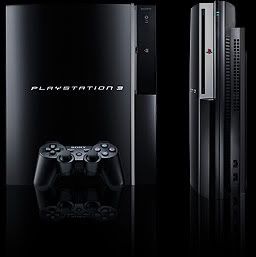
PS3 in general and moving from the PS2

By: Michael Norris

How well do you really know the PS3?

As you know, when you buy a PS3, there are many, many options and things to do on it. They only problem is while you try some of the many options available you miss some other key components to optimize your PS3 experience.

There are things I didn't know and still don't know about the PS3. For instance, how many of us had a PS2 before the PS3? Probably a lot, but what scared me when I opened the box was that there was no memory slot to get all your old games back! I was scared at first but then a friend told me how to solve the problem.

The solution I found was a little thing called a PS3-PS2 memory card adaptor. It is a small device you can plug a memory card into that has a USB plug at the end. I got one off my friend and in 5 minutes all my old games were back, and forever saved on the PS3!

The PS3-PS2 memory card adaptor usually runs from about $10-15 nowadays but can be found in used bins for less. There are quite a few useful tools for the PS3 out their even though their are a huge amount already installed.

Apart from the just the PS2 memory adaptor trick there is a huge selection of things on the PS3 most people don't know about, or notice. Most of the stuff you miss is simply the fact that much bigger toys are in the way. Of course with the PS3's huge option base there is a large number of things you can mess up or get glitched on.

For more essential help, tricks of the trade, and general tips you don't hear about visit my sight. I take all questions and suggestions visitors have, and I'm putting in more all the ti

Tuesday, 15 April 2008

Enjoying Movies And Video Games The Right Way

by: John Wilkerson

There is only one way to play video games now days and that is playacting them on a HDTV. Whatever people have told you, what ever your friends, family, or co-workers have told you, HD is the only way to go. Ok you might just happen to be an individual that has never seen something in HD and that is alright, your not alone. Just about everyone in the United States has heard of HD but truly don't believe what it is. A simplified way to explain it is that the resolution of the image is greatly improved. Improved? One may ask, well yes that is just it. So you should go out right now and see for your self. Now back to video games on a HDTV. For starters the image is much clearer. When it is not in HD the image has what looks like to be a fuzz effect going on with it. Now if you are one of those people that have never seen HD then you will not note it and would have to look for it. But if you do have a HDTV and play your video games on it normally you will in fact observe a fundamental difference the calibre of picture. Not only that, if you were to play a video game that you play oft in HD and then switched it over to standard definition it would be enough to make your self displeased. Also it is a great excuse for you to go out and buy a HD DVD player. That way you can start buying HD movies and when you see an ad on TV about a flick and it says also comes in HD you can go out and buy it. The only down side to buying HD movies is the increase in cost of the movie. You can ordinarily get a normal DVD at around twenty dollars, for a HD film you will be spending up wards to around thirty dollars. Although that might be a lot for just one picture, HD movies come with an extreme amount of volume compared to just a typical DVD. On every HD DVD there are just about all the extras for that movie that you possibly could want. If you need behind the scenes or interviews with the cast of the show they are all there. I have personally only seen a couple of HD DVDs my self one being Pirates of The Caribbean: At Worlds End which was a outstanding film, but I know for a fact that all HD DVDs have all of the content I have just said. It is kind of like a guarantee when buying a HD DVD player. Not only do you get an amazing improvement in the calibre of the picture but you get all of the in depth reporting of the picture it self. I would say to all gamers or film lovers that enjoys watching TV in general and is looking for a finer experience save yourself the anguish of standard definition and buy a HDTV.

Visitors Statistics

Add to Technorati Favorites
 
Google